Summary: Understanding keyboard switches helps users choose the right typing experience. This guide explains linear tactile and clicky switches in detail while helping you identify the best keyboard switches for gaming and work. It also explores how silent keyboard switches fit into modern setups, offering clarity for both beginners and enthusiasts who want precision and comfort in every keystroke.
Mechanical keyboards still influence the modern workstations and gaming systems with their accuracy and customization. The selection of the best keyboard switches for gaming is based on the behavior that each type of the switch might exhibit in various situations. The silent keyboard switches are also examined by a significant number of users who need to operate in a quieter environment and still have the same performance. Each type of switch has been broken down in this guide in a manner that allows you to make an informed decision in making a choice.
Understanding Keyboard Switch Basics
Keyboard switches act as the core mechanism under each key. The registering of each press is by a spring force and electrical contact. Switches are varied by type of feedback, sound profile, and actuation force.
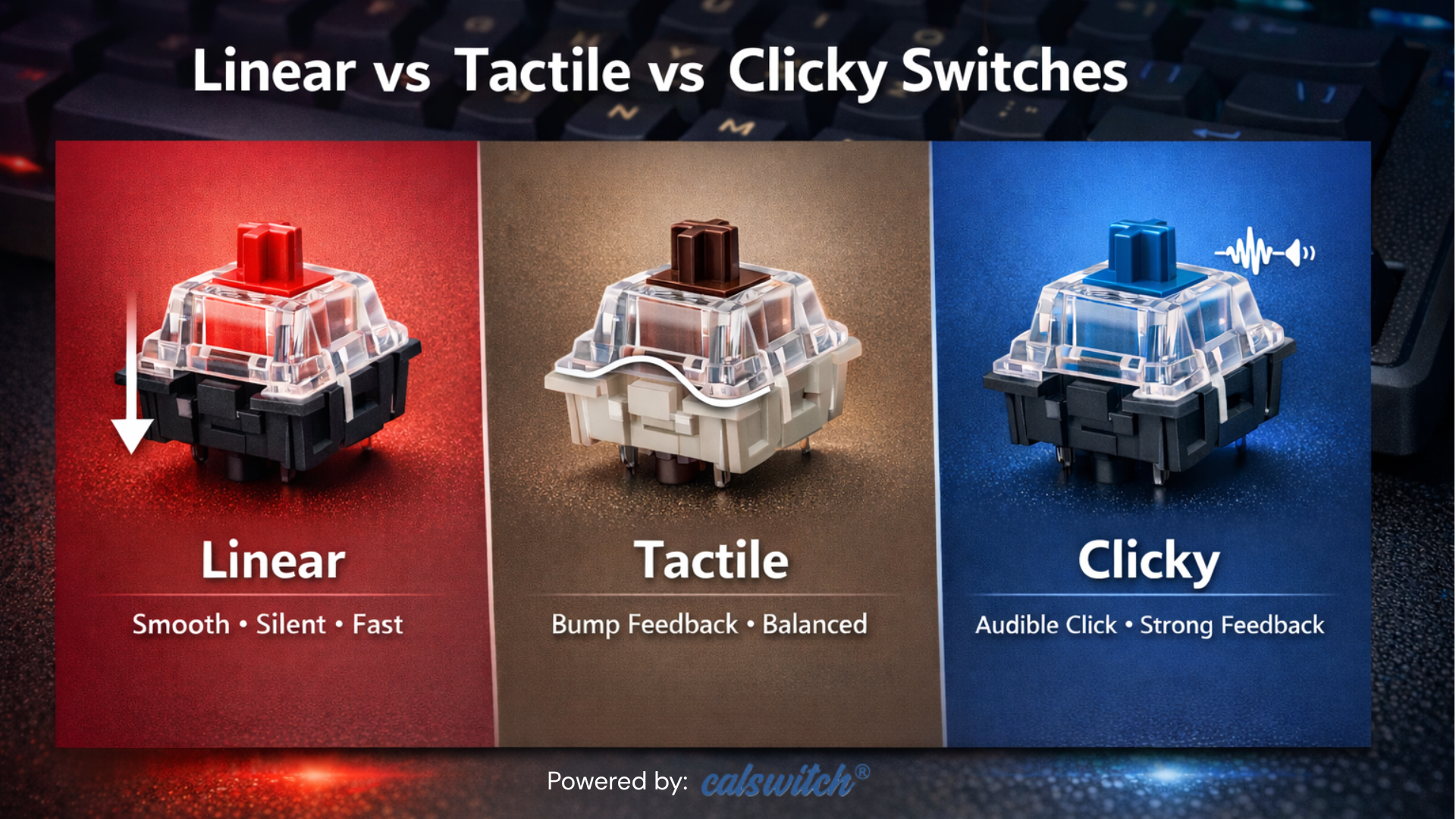
Most switches are defined by three major categories.
- Linear
- Tactile
- Clicky
They both have their own purpose to fulfill and appeal to various users. Knowing how they are organized assists users to match their options with the day-to-day tasks.
What Are Linear Switches?
Linear switches provide an unbroken and consistent keystroke from top to bottom. They lack bumps of touch and clicks of sound.
Important Linear Switch Characteristics.
- Fluid keystrokes and non-discontinuity.
- Minimal noise output.
- Fast actuation that is possible with fast input.
Linear switches are more likely to be desired by gamers because they move continuously. This design enables quicker repetitive keystrokes, and this increases faster reaction time in competitive situations.
Linear switches are among the best keyboard switches in gaming situations, as users of these switches in various gaming situations deem them to provide less resistance and enhance speed.
What Are Tactile Switches?
Tactile switches have a bump when they are actuated. This bump is an indication that a keypress can be registered without having to give a full press.
Key Characteristics of Tactile Switches
- Physical feedback during actuation.
- Moderate noise level.
- Balanced typing experience.
Writers and professionals tend to use tactile switches since they provide feedback with the required level of noise. Such feedback is used to minimize typing errors and enhance rhythm.
What Are Clicky Switches?
Clicky switches are tactile feedback devices that are audible to use as well. Both physical and auditory confirmation is given by each press.
Key Characteristics of Clicky Switches
- Distinct click sound.
- Strong tactile feedback.
- Higher noise output.
The Clicky switches are attractive to those users who like a heavy typing feel. They also develop a pleasing rhythm, particularly when typing long.
Key Differences Between Linear Tactile and Clicky Switches
1. Keystroke Feel
- Linear switches are smooth to the press.
- A bump is added through tactile switches.
- Bump and sound are introduced by Clicky switches.
This distinction determines the feeling of every switch as it is being used.
2. Sound Profile
- Linear switches do not make any noise.
- Tactile switches generate average noises.
- Clicky switches produce high clicks.
Silent keyboard switches are also used by users in a shared environment to avoid any distractions and remain focused.
3. Actuation Feedback
- Linear switches do not provide any form of feedback.
- Actuation of tactile switches is indicated by a bump.
- Clicky switches are both audio and tactile.
Feedback has an effect on typing accuracy and comfort.
4. Speed and Performance
- The key presses are quick in linear switches.
- Tactile switches compromise speed and precision.
- Clicky switches prioritize feedback over speed.
Responsiveness-oriented gamers consider such factors prior to choosing switches.
How to Choose the Right Switch for Your Needs?
For Gaming
Linear switches provide uniformity and speed. They are appropriate in high-speed games where a millisecond counts.
For Typing and Office Work
Tactile switches are more controlling and have fewer typing errors. They help in long-time writing without being fatigued.
For Feedback Enthusiasts
The clicking switches make typing interesting. They are appropriate to users who believe in sound and tactile feedback.
For Quiet Environments
The noisy aspect of using a keyboard is usually avoided by the user who works in a common area or during the late hours to ensure that he or she continues working without being distracted by the noise.
Build Quality and Durability Considerations
Switch life is significant in long-term performance. The majority of the high-quality switches sustain millions of keystrokes. Such materials like POM stems and reinforced housings enhance life.
Premium evaluators must pay attention to.
- Actuation consistency.
- Material quality.
- Brand reliability.
A trusted supplier guarantees a good performance in terms of batch consistency.
Popular Use Cases Across Industries
Gamers are not the only ones who are served by mechanical switches. Their diversification serves many industries.
Gaming
Speedy response and dependability are the most important.
Programming
The use of tactile feedback enhances the accuracy of coding.
Content Creation
Long typing is also a necessity to feel comfortable.
Office Work
Balanced switches minimize fatigue and increase efficiency.
Customization and User Experience
Switches can be mixed and matched using custom keyboards. This is a flexibility that improves personalization and performance.
Users often experiment with
- Switch weight.
- Keycap profiles.
This customization revolutionizes a normal keyboard into a customized instrument.
Common Mistakes to Avoid When Choosing Switches
Ignoring typing habits leads to poor choices.
- Concentrating on sound and not on performance.
- Neglect of actuation force.
- Failure to test switches prior to their purchasing.
A thoughtful approach helps users avoid unnecessary upgrades.
Future Trends in Keyboard Switch Technology
The design of keyboard switches is still developing due to user requirements and innovation. Manufacturers emphasize better keystrokes, better durability, and a lower level of noise. The high-tech materials and factory lubrication can ensure the consistency throughout all presses. The hot-swappable keyboards also enable the user to experiment without the need to solder, and this enhances accessibility. Most brands now perfect silent keyboard switches to provide almost silent performance without loss of feedback. When they select switches that are compliant with future-ready configurations and long-term usability, users who follow the trends in the industry have an advantage.
Conclusion
Choosing between linear tactile and clicky switches depends on personal preference and usage goals. Each type offers unique benefits that align with different workflows. Users searching for the best keyboard switches for gaming should evaluate speed, comfort, and durability before making a decision.
CalSwitch continues to support users with reliable switch options that meet professional and enthusiast standards.
FAQs
1. Which switch type is best for beginners?
Tactile switches serve beginners well because they provide feedback without excessive noise.
2. Do linear switches work well in typing?
Linear switches are used in typing, but some users might want to use the touch to be sure.
3. Why are clicky switches loud?
Clicky switches consist of a device that creates a unique sound when they are acted upon.
4. Do silent switches reduce performance?
Silent switches are effective in performance and produce less noise, hence they are suitable in common places.
5. How do I test switches before buying?
Switch testers or sample packs should be tried by users in order to get a feel and response prior to purchasing.